

A web user interface (Web UI) is the browser-based visual and interactive layer of a web application that allows users to view information, enter data, and perform actions without installing software locally. It connects user interactions to underlying application logic through standard web technologies such as HTML, CSS, and JavaScript.
Businesses use website builders to create clean, easy-to-use interface experiences. These tools often provide domain name offerings, search engine optimization (SEO), analytics, e-commerce plugins, and mobile web functionality.
A web user interface is the visual layer of a web application that enables browser-based interaction. It includes elements like buttons, menus, forms, navigation components, and content blocks that connect users to underlying systems. Common types include graphical, touch-based, menu-driven, and command-line interfaces. Strong Web UI design improves usability, accessibility, and engagement through consistency, responsiveness, and user-centered research.
The main types of web user interfaces are graphical, touch-based, menu-driven, and command-line interfaces. Each type differs in how users provide input and navigate the system.
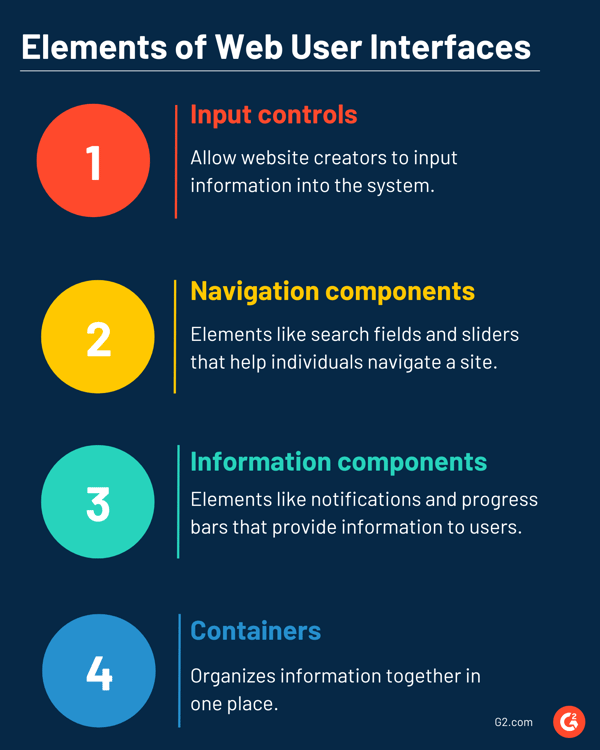
The basic elements of a web user interface include input controls, navigation components, information displays, and content containers. These components structure interactions and guide user behavior.
A well-designed web user interface improves usability, reduces friction, and supports task completion. Clear structure and intuitive interaction increase engagement and retention.
An effective web user interface design depends on the website, the intended audience, and the goals of each page. Businesses should generally follow best practices to design web user interfaces that users will love.
A GUI refers to any visual interface that allows users to interact with software through graphical elements. A Web UI is a specific type of GUI designed to operate within a web browser. While both rely on visual interaction, they differ in scope, environment, and deployment.
| Basis | Web UI | GUI |
| Scope | Specific to web applications | Applies to all visual software interfaces |
| Where it runs | Inside a web browser | Desktop, mobile, embedded systems, or web |
| Installation | No local installation required | Often installed on a device |
| Platform dependency | Cross-platform through browsers | May be OS-specific |
| Examples | SaaS dashboards, web portals | Desktop apps, system settings, design tools |
Here are answers to common questions about the web user interface.
You access a web user interface by opening a browser and entering the application’s URL. The interface loads in the browser and does not require local installation.
Yes. A Web UI can be accessed through mobile browsers on smartphones and tablets. When built responsively, it adapts to smaller screens and touch interactions.
A website mainly presents information, while a web UI enables structured interaction within a web-based application. Web UIs are designed for task execution rather than passive content viewing.
A web UI is secure when it uses encrypted connections, authentication mechanisms, and controlled access to protect user data and system integrity.
Strong interfaces don’t happen by accident. Discover how user-centered design shapes more intuitive and effective digital products.

What is social computing? Social computing is the use of digital platforms and computational...
by Alyssa Towns

What is a user interface (UI)? A user interface is a connecting point between humans and...
 by Holly Landis

What is user-generated content? User-generated content (UGC) is content that unpaid consumers...
by Alyssa Towns