


Choosing the best CRM software can feel overwhelming. With countless options on the market, it’s easy to get lost in features, pricing models, and promises.
I’ve spent years working with sales and marketing teams, seeing firsthand what works and what doesn’t when it comes to managing customer relationships. Sitting with sales reps during their meetings taught me about their frustration with clunky software and deals falling apart because critical follow-ups slipped through the cracks. I’ve also seen my sales colleagues lose valuable time troubleshooting CRMs that were not designed to meet their needs.
A clunky or overly complicated CRM slows down your team and impacts your bottom line. The best CRM software acts as an extension of your sales process—empowering reps with insights, automating repetitive tasks, and enabling them to focus on what matters the most: building relationships and closing deals.
To help businesses avoid the missteps I’ve encountered in the past, I've partnered with sales professionals and Blue Bowen, our resident expert on CRM solutions, to assess 30+ CRM solutions based on real-world sales needs: usability, automation capabilities, scalability, reporting, and integration with email and marketing software. I’ve also analyzed G2 reviews to get a clearer picture of what real CRM users value most. These insights helped me understand the common pain points users face, ensuring the CRM recommendations below align with your business needs.
TL;DR: According to my research and G2 reports, the best CRM software are Agentforce Sales, HubSpot Sales Hub, Pipedrive, Close, ActiveCampaign, Zoho CRM,Bigin by Zoho CRM, HighLevel, Monday CRM, SAP Sales Cloud, and CRMOne.
*These collaboration tools are top-rated in their category, according to G2 Summer Grid Report 2026. I’ve also added their monthly pricing to make comparisons easier for you.
A CRM helps you store customer contact details, manage the sales pipeline, gain insights into sales forecasting trends, and automate repetitive tasks like sending follow-up reminders. CRM tools let you share notes on customer interactions, so you can collaborate better with account executives, BDRs, and customer success teams.
According to Grand View Research, the global customer relationship management market is projected to reach $163.16 billion by 2030, growing at a CAGR of 14.6% from 2025 to 2030.
I spent weeks working with our in-house CRM experts and sales teams to really get to the bottom of what CRM tools can do. My goal was simple: figure out what they’re great at, where they fall short, and whether they’re worth your time. I also sifted through countless user reviews on G2 to gather and analyze feedback straight from the people who use CRMs every day. To top it off, I used G2’s Grid Reports to see how these tools stack up against each other and pulled together this list of the best CRMs just for you.
Best CRM software goes one step further by letting you access customer data, performance metrics, and sales pipeline from a single dashboard. I’m all about tools that make life easier, so I love it when CRM systems include automation for managing leads and running email campaigns. Plus, they integrate with analytics tools and calendars. And some also offer AI-powered insights to help you stay on top of high-value leads and sales KPIs.
of B2B decision makers think sales reps are unprepared to effectively engage with customers.
Source: Sales Lion
The importance of CRM features depends on the role of end users and their daily tasks. Here's what I think sets the best CRMs apart from the rest. These are also the criteria based on which we evaluated the CRM solutions.
Over the past few weeks, I've evaluated over 30+ CRM tools, and the 11 that made the cut really stood out. They impressed me with how easy they are to use, their ability to automate sales processes, deliver data-driven insights, and handle task management.
To be included in the CRM Software category, a product must:
I’ve consistently received strong feedback on Agentforce Sales (formerly Salesforce Sales Cloud) comprehensive CRM capabilities.
Users highlight its ability to manage leads, contacts, and opportunities seamlessly, while also appreciating the advanced reporting tools and real-time dashboards that support data-driven decision-making.
As a category leader on G2 based on, Agentforce Sales has achieved a stellar customer satisfaction score of 99, with a 72% average adoption rate and a 15-month estimated ROI payback.
What stands out across many reviews is the platform’s high level of customization and scalability. I’ve read that businesses can adapt Salesforce to suit their unique workflows and that it scales effectively as teams grow. The integration capabilities are another major plus—users frequently mention how well it connects with marketing automation tools, accounting software, and customer support platforms.
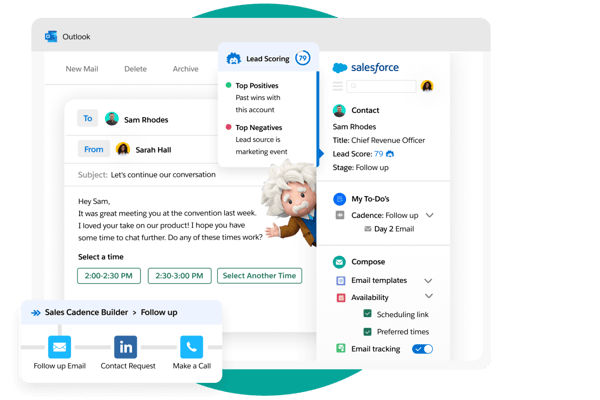
According to G2 user reviews, Agentforce Sales is admired for its depth and flexibility, though its feature set can feel overwhelming at first. New CRM users often mention that while customization is powerful, it may require technical expertise, which can slow down implementation if internal resources are limited.
Overall, G2 sentiment emphasizes that Salesforce Sales Cloud delivers unmatched CRM capabilities, with critiques mostly centered on onboarding complexity, pricing, and scale performance rather than its core strengths.
“The reporting capabilities and object features in SF make it very handy for us. We can define the architecture for the types of records we want to save, and the flexibility of the platform is a big plus. The Lightning interface is also very easy to use. We’ve completed various internal integrations with SF, especially with our higher ed tools.When it comes to SF support, they always notify us if any upgrades need to take place, and we haven’t experienced any downtime. Pricing is on the higher end, but it does what we need it for, so overall it’s a good tool for us.”
- Agentforce Sales review, Yash W.
“One thing I dislike about Agentforce sales is that the platform can feel overly complex, especially for new users. There are so many features, menus, and configuration options that it creates a steep learning curve and can slow adoption for teams that aren’t very technically experienced.”
- Agentforce Sales review, Souvik D.
Need help with sales enablement? Check out how to create a sales enablement strategy and the software that can help you.
I’ve come across a lot of positive feedback about HubSpot Sales Hub, particularly around its user-friendly design and productivity-focused tools.
As a category leader on G2-based reviews, HubSpot Sales Hub has received an excellent customer satisfaction score of 99, with a 71% average user adoption rate and a 12-month estimated ROI payback.
One standout feature that users frequently mention is the Prospecting Workspace. It brings daily sales activities into one centralized view, which many say helps them stay organized and avoid the distraction of switching between tools.
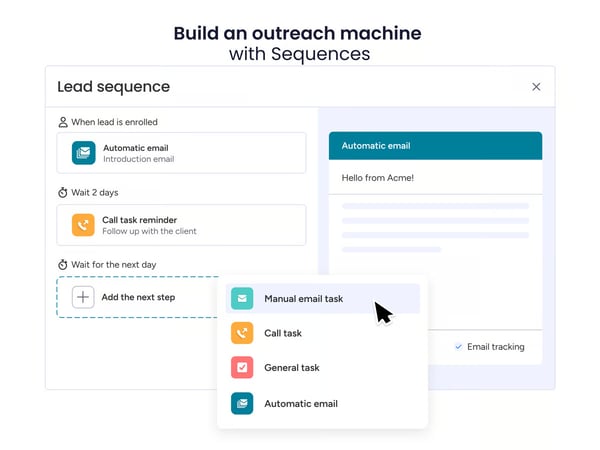
Another feature that consistently gets praise is the Meeting Scheduler. I’ve read that its seamless calendar integration makes it easy for prospects to book time, reducing the need for back-and-forth emails. The Sequences functionality is also well-received—it allows for automated, personalized follow-ups that maintain a human touch, which users find valuable for nurturing leads efficiently.
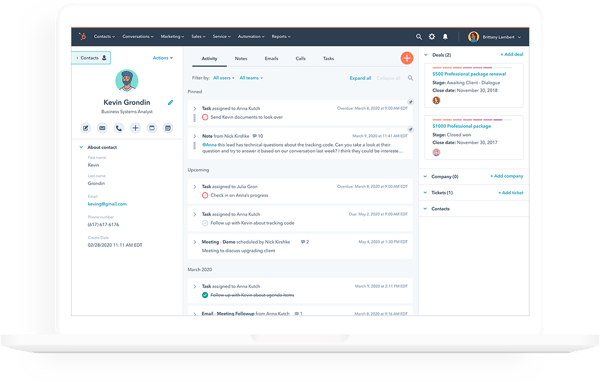
According to G2 user reviews, HubSpot Sales Hub is appreciated for its approachable design, though some of the more advanced tools can feel a little daunting at first. A few reviewers also mention that customization is limited in the free or entry-level tiers, which may restrict flexibility as teams grow.
Overall, G2 sentiment highlights HubSpot Sales Hub as a user-friendly and effective CRM, with critiques centered on advanced feature complexity, entry-level customization, and contact management depth rather than its overall usability.
“I really value how clearly everything is structured in HubSpot Sales Hub. The sections are intuitive, so information does not get lost or buried, which makes it easy to stay organised and efficient. I also appreciate how well it integrates with the other tools I use, allowing for a smoother and more connected workflow.”
- HubSpot Sales Hub review, Andrew B.
"What I dislike about HubSpot Sales Hub is that some of its more advanced features can become complex to configure, particularly when it comes to automation and customization. While the platform performs well overall, there can be occasional limitations when handling highly specific or non-standard workflows."
- HubSpot Sales Hub review, Zoi B.
I’ve come across a lot of positive feedback about Pipedrive, especially when it comes to ease of use.
Based on G2 reviews, Pipedrive has been ranked as a category leader on G2, with a stellar customer satisfaction score of 94. It has also achieved an average user adoption rating of 73% and an 8-month estimated ROI payback for the overall segment.
One of its strongest points is its clean, intuitive interface—many teams, including ours, found it easy to get started without needing much training. The visual sales pipelines are a real asset, helping users track deals, activities, and progress in real time, which ultimately speeds up the sales cycle.
Another key advantage is its time-saving automation features. I’ve read that teams appreciate being able to streamline repetitive tasks so they can spend more time actually selling. The pricing is also considered reasonable for small teams or businesses looking for a straightforward CRM without the overhead of a complex setup.

According to G2 user reviews, Pipedrive is praised for its ease of use and pipeline management focus, though it lacks some advanced CRM depth. Automation and email campaign features are seen as fairly basic, and integrations often depend on third-party tools, which can add complexity and cost.
Overall, G2 sentiment reflects that for teams looking for the most user-friendly CRM for sales teams, with drag-and-drop pipelines, automation, and activity tracking for SMBs, Pipedrive is the way to go.
"I've been using Pipedrive for a long time. Some advanced reporting and automation features could be more flexible, for example, and certain integrations require higher tier plans. The mobile experience can also be improved, slightly, for managing complex workflow on the go. Certain automation features are also locked behind higher price tiers, and deeper analytics would make the platform even more valuable for growing sales teams and salespeople like me."
- Pipedrive review, Neel R.
Creating a sales playbook? Learn how to maximize the value of a sales playbook.
While exploring Close, I noticed it’s often praised for its simplicity and ease of use, particularly for small to mid-sized sales teams. The interface is clean and intuitive, making daily operations straightforward even for those new to CRM tools.
Based on G2 reviews, Close has achieved a stellar customer satisfaction score of 99, with 94% users willing to recommend it to others for lead management, performance, reliability, and desktop integration.
One of the standout features I’ve come across is the integrated calling and email functionality. Users appreciate being able to manage all communications directly within the platform, streamlining workflows without needing to switch between tools.
Smart Views—customizable, real-time mini-reports—also receive positive mentions for offering quick insights into lead activity and sales progress. Additionally, the bulk editing capability is valued for making it easy to update multiple records efficiently.
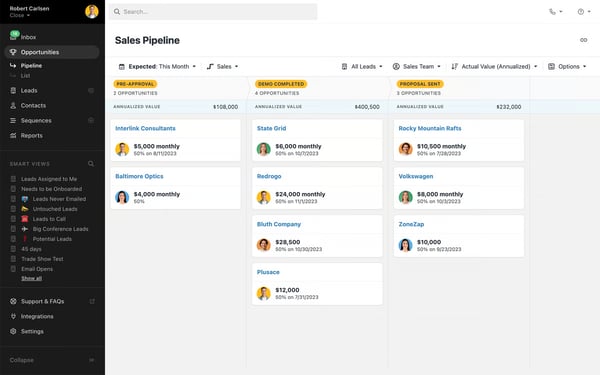
Another recurring theme in G2 feedback is around pricing and support. Reviewers mention limited flexibility in plans and some frustration over unexpected increases. Customer support generally handles basic queries well, but technical issues and data imports—especially with custom fields—can take longer to resolve.
Overall, G2 sentiment reflects Close as a straightforward, user-friendly CRM that works especially well for lean sales teams, even if scaling and advanced customization may require trade-offs.
"Just the pricing seems to be a bit high for us at scale, no other complaints."
- Close review, Vatsal N.
From what I’ve seen, ActiveCampaign earns praise for effectively blending CRM functionality with robust marketing automation.
According to G2 reviews, ActiveCampaign has received a customer satisfaction score of 95, making it a category leader on G2. Further, the average user adoption for the overall segment is 71%, with an 11-month estimated ROI payback.
Many users appreciate how the platform streamlines customer relationship management while enabling complex, dynamic workflows that make personalized engagement easier and more efficient.
I’ve read that one of its biggest strengths is ease of use—after the initial learning curve, teams often find it intuitive to manage customer lists and launch campaigns. The wide range of integration options also stands out. Whether connecting to eCommerce platforms like Shopify and WooCommerce or other business tools, users note that the process is smooth and reliable.
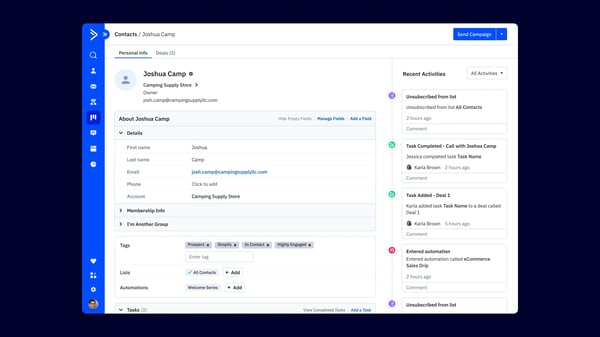
Another theme in G2 feedback is around complexity and pricing. While the platform offers powerful advanced features, some reviewers note that they can feel overwhelming without consulting the help documentation. Others mention that costs rise quickly as businesses expand their feature needs, which can be challenging for smaller teams.
Overall, G2 sentiment reflects ActiveCampaign as a feature-rich platform that delivers strong marketing automation and CRM value, even if usability and pricing require some consideration
“What I like most is that the UI/UX is very clear and easy to use. It also has one of the best automation systems out there—I use automations a lot, and this is by far the best one I’ve worked with. I also love the CRM management: the way it filters tags and organizes everything about each contact into columns makes it very straightforward and simple to manage."
- ActiveCampaign review, Tomás Alejandro M.
“Pricing scales aggressively once you cross contact tiers, which can make it a harder sell for small service-based clients just getting started. The reporting dashboards are functional but feel a step behind competitors — exporting campaign data for client-facing reports usually means pulling into a separate tool."
- ActiveCampaign review, Lila S.
Can't engage with prospects and buyers effectively? Check out how sales readiness can help.
From what I've seen, Zoho CRM stands out as a full-featured, cloud-based platform that grows with a business—from small teams to global enterprises—without the heavy price tag of the bigger names. Based on 2026 G2 reviews, users describe it as a 360° system that pulls sales, customer data, and automation into one place, and many highlight how quickly they were up and running after a straightforward initial setup.
Based on G2 data, Zoho CRM holds a 4.1-star rating across 2,000+ reviews, and the bulk of its recent 2026 reviews land in the 4- and 5-star range. Most of that recent feedback comes from small-business and mid-market users, which tracks with how the platform is positioned.
One of the most consistent themes I came across is ease of use. G2 reviewers repeatedly describe the interface as intuitive and easy to navigate, noting that even non-technical team members can start managing leads and deals without much training. Several mentioned that the platform is approachable enough for newcomers while still being powerful under the hood, which helps drive adoption across a team.
Affordability is another strength that shows up again and again. Reviewers frequently point out that Zoho CRM delivers a wide feature set at a fraction of the cost of competitors like HubSpot or Salesforce. I noticed price-conscious teams, including nonprofits, calling out the value for money, with some specifically appreciating the discounts and the breadth of functionality available at lower tiers.
Customization is where Zoho CRM really earns its reputation. G2 users praise the Canvas drag-and-drop editor for letting them redesign the look of the CRM rather than living in a spreadsheet-style layout, and many value the ability to tailor pipelines, build Blueprints that standardize each sales stage, and set up lead scoring and multi-currency support. This flexibility lets teams adapt the CRM to their own process instead of reshaping their process around the software.
Workflow automation is a recurring favorite, too. Reviewers highlight how lead routing, follow-ups, email sequences, scoring, and status updates cut down on repetitive admin work. From what I've seen, this is one of the biggest time-savers users mention, helping ensure no step in the sales process slips through the cracks as deals move forward.
Integrations and the broader Zoho ecosystem also draw strong praise. The platform connects with 500+ business apps and slots neatly into tools like Google Ads, Google Analytics, and Zoho Social, as well as marketing and accounting software. Users note that this gives them a unified view of their data and removes the friction of jumping between disconnected tools.
Finally, several reviewers appreciate the AI and analytics layer. Zoho's AI assistant, contextual insights, and sales forecasting come up as genuinely useful for content planning, spotting patterns in what leads care about, and getting real-time visibility into pipeline health and churn risk—particularly valuable for leaders trying to move from reactive to proactive decision-making.
That said, the most common criticism is the learning curve. Because nearly everything is customizable, the interface can feel cluttered with modules and tabs, and reviewers note it gets less intuitive as you move into advanced configuration. Building complex workflows, automations, or custom modules can take significant time and often calls for a dedicated admin or technically comfortable team member.
The other recurring frustration centers on support and integrations. Several users mention that support can lean on email tickets with slower-than-ideal response times, which is painful when a workflow breaks. A few also flagged that API documentation can feel inconsistent, making more advanced integrations a trial-and-error process, and that reporting could offer more customization out of the box.
Overall, G2 sentiment reflects Zoho CRM as a flexible, affordable platform that scales from small teams to global operations—provided you're willing to invest some setup time and lean on its deep customization to make it your own. For businesses that want depth and value without enterprise-level pricing, it's a strong contender.
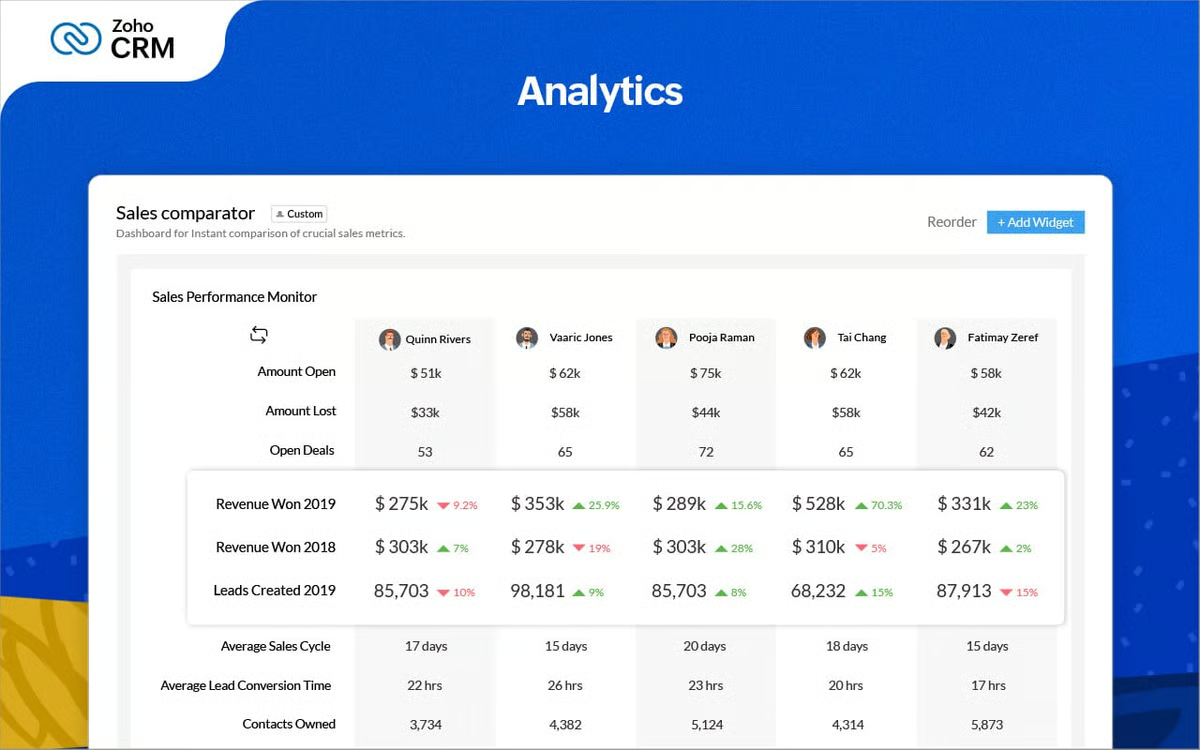
“What I like best about Zoho CRM is its user-friendly interface, customization options, and wide range of features for managing customer relationships, sales, and support in one place. It helps streamline daily work, improve team collaboration, and automate repetitive tasks, which saves time and increases productivity. The integration with other Zoho applications and third-party tools is also very helpful for business operations."
- Zoho CRM review, Suraj B.
“Integrating different services using API is a big mess. The documentation can sometimes feel unclear or not detailed enough for specific use cases, which leads to trial-and-error during implementation. Another issue is inconsistency in API behavior or responses, which makes debugging time-consuming. Even small integrations often require multiple iterations to handle authentication, data mapping, and error handling properly.”
- Zoho CRM review, Abhishek Pratap S.
I’ve come across Bigin by Zoho CRM as a standout option for teams that value simplicity without compromising on functionality.
Based on G2 reviews, Bigin by Zoho CRM has earned a customer satisfaction score of 76. Its average user adoption rate is 59%, and its estimated ROI payback is 7 months.
One of the first things I noticed is how easy it is to get started—there’s barely any learning curve. The platform is intuitive, and most users seem to navigate it comfortably without needing to spend much time with documentation or onboarding guides.
The visual pipeline management is another highlight. It offers a clean, straightforward view of the sales stages, making it easy to track deals from initial contact to closure. I found the setup process smooth, and customizing the pipeline to align with our team’s sales flow took just a few minutes.
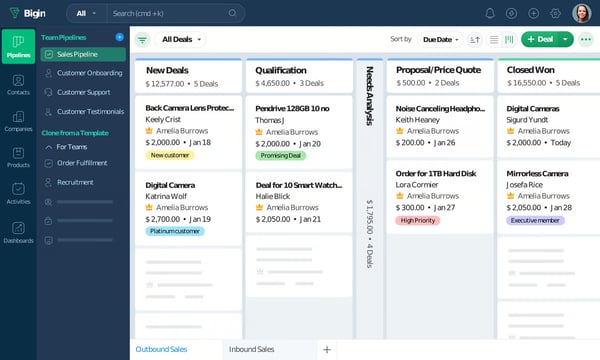
Another theme in G2 feedback relates to reporting. The built-in reports handle core metrics well but don’t offer much depth or customization, which may feel limiting for teams that want advanced analytics or deeper performance insights.
Overall, G2 sentiment reflects Bigin by Zoho as a lightweight and user-friendly CRM for smaller businesses, even if customization and reporting options are less advanced than larger platforms.
“We recently started using Zoho Bigin CRM for managing enquiries and student interactions at Sankhyiki, and the experience so far has been very smooth. What we really like about Bigin is its simplicity. Unlike many CRMs that feel complicated and overwhelming, Bigin is extremely easy to set up and start using. The pipeline view makes it very intuitive to track leads from enquiry to conversion, which is very helpful for an education business like ours where we deal with a large number of student queries.”
- Bigin by Zoho CRM review, Akshay C.
“I noticed customization feels a bit limited when I try to make very specific changes, like adjusting layout or fields exactly the way I want. For normal daily use it works fine, but for more detailed control it can feel a little restricted. Also on mobile it works well for basic use, but sometimes checking or editing full details on a small screen feels a bit less comfortable, especially when there are more entries”
- Bigin by Zoho CRM review, Ishan S.
Want to see how CRM analytics takes your client understanding to the next level? Learn how to use CRM analytics to gain a new perspective on your customers.
From what I’ve seen, HighLevel is a popular choice for agencies and growing businesses that want CRM, marketing automation, communication, and lead management in one platform. Users frequently mention that having funnels, SMS, email marketing, scheduling, and pipelines under one roof simplifies their workflows and reduces tool overload.
One feature that I see getting a lot of praise is HighLevel’s automation builder. Based on recent G2 reviews, users appreciate how easily they can automate follow-ups, appointment reminders, lead nurturing, and customer communication without juggling multiple apps.
Another commonly appreciated element is the platform’s white-label and customization capabilities. I’ve noticed agencies especially value the ability to brand the platform, manage multiple client accounts, and customize workflows to fit different business needs.
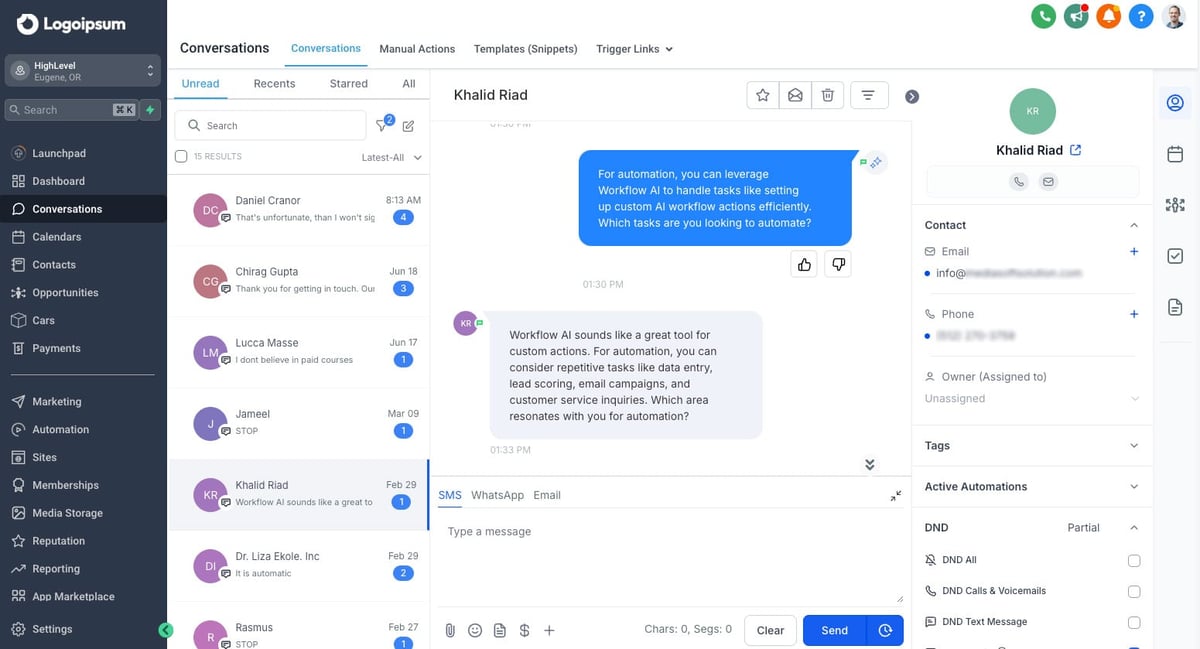
I’ve also come across positive feedback around the value for money. Many users mention that HighLevel replaces several standalone tools, helping businesses consolidate costs while still accessing advanced sales and marketing features.
Based on my review of recent G2 feedback, the biggest drawback is the learning curve. While users appreciate the extensive functionality, many reviewers mention that setup and workflow configuration can initially feel overwhelming for new teams.
Overall, G2 sentiment reflects HighLevel as a powerful all-in-one platform for businesses focused on automation and scalability. Users consistently praise its flexibility, communication tools, and value, while most criticisms center around onboarding complexity.
“HighLevel is an all in one solution that saves time, effort and money spent of several different tools. It has funnel and website builder, smart automations, email marketing, tagging, calling and most of all AI implemented in everything. The UI is also very user friendly and smooth. You can integrate as many 3rd party tools you want. The pricing is affordable and can easily put cap to get more ROI. Their support is also very good and quick. Overall performance is 100/100.”
- HighLevel review, Chandan M.
“It's a huge tool, so that makes a quality knowledge base important. I think they could improve their training. Some of the people available by phone are tough to work with, mostly just difficulty in communicating.”
- HighLevel review, Jim B.
I've noticed that Monday CRM is widely praised for its user-friendly interface and high level of customization.
Based on G2 reviews, Monday CRM has a customer satisfaction rating of 73. Its average user adoption rate is 71%, and its estimated ROI payback is 12 months.
The platform's design makes it easy to navigate, even for those without much technical experience. I’ve read that users appreciate how the workflows are visualized clearly, whether through Kanban boards, timelines, or simple lists, making it easier to track progress.
One feature that stands out is its flexibility in customizing workflows for pipeline creation and automating processes. I’ve come across feedback highlighting how users value the integration capabilities with third-party tools like Slack, Google Workspace, and Microsoft Teams, which help streamline work across different platforms.
Another aspect that I’ve found many users appreciate is Monday CRM's ability to foster team collaboration and project management. Shared boards and team updates ensure alignment, and the variety of templates provided allows users to start projects quickly without having to create new templates from scratch.
Another theme in G2 feedback relates to reporting and onboarding. The reporting tools work for basics but lack the depth and customization some teams expect, and new users sometimes find the breadth of features overwhelming at first.
Overall, G2 sentiment reflects monday CRM as a versatile and visually intuitive platform, with most drawbacks linked to plan limitations, reporting depth, and the learning curve.
“I use monday CRM mainly to keep all my leads and artist conversations organized in one place, which helps to segregate and keep track of them, especially regarding which conversation pipeline they are in. The biggest benefit has been the clarity and structured workflow, resulting in less of a mental load and more visualization of engagements with collectors and artists. I personally like how easy it is to understand everything at a glance. .”
- Monday CRM review, Manish C.
“Reporting and dashboards can take time to fine-tune if you need very specific metrics, and certain automations or integrations are limited to higher-tier plans.”
- Monday CRM review, Christian K.
From what I’ve seen, SAP Sales Cloud is a robust CRM solution designed for organizations managing complex, end-to-end sales processes.
Based on G2 reviews, SAP Sales Cloud has achieved a customer satisfaction score of 67 and a market presence score of 85, with a 62% average user adoption rate and a 20-month estimated ROI payback.
Users frequently highlight its comprehensive suite of features—from lead and opportunity management to account and territory planning—which makes it a strong fit for enterprise-level sales teams.
What stands out is its deep integration with the broader SAP ecosystem. I’ve read that syncing with SAP ERP and SAP S/4HANA allows for a unified view across departments, helping teams work from a single source of truth. The platform also earns praise for its flexibility, with customizable dashboards and advanced reporting that can scale with evolving business needs. Its built-in analytics and AI tools are often cited as valuable for generating predictive insights and supporting confident sales forecasting.
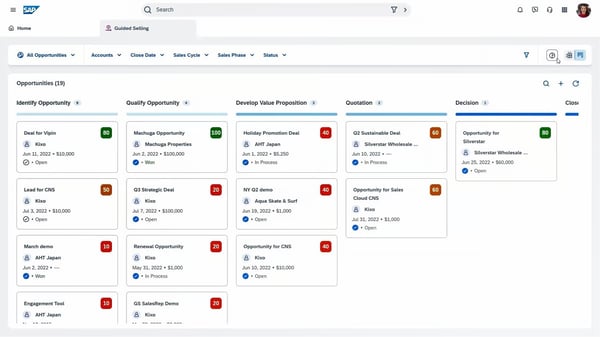
According to G2 user reviews, SAP Sales Cloud is praised for its enterprise-grade capabilities, though implementation is often described as complex. Configuring it to match specific workflows comes with a steep learning curve, and teams typically need extensive training to unlock its full potential.
Another theme in G2 feedback relates to cost and customization. The platform is positioned for larger organizations, making it less accessible for smaller businesses. Reviewers also note that customizing beyond standard modules can take significant effort, and performance may occasionally lag when working with very large datasets.
Overall, G2 sentiment reflects SAP Sales Cloud as a powerful solution for enterprises seeking depth and scalability, even if accessibility, setup, and performance may present challenges.
“I really love how SAP Sales Cloud covers the whole sales process so well. We can track everything step by step, from getting new leads, sending out fabric quotes and arranging product samples, all the way to negotiating bulk orders and closing deals. It fits our textile wholesale business really well and keeps all our sales work well organized. I also find its customer profile management extremely useful. We can record all client details clearly, such as their favorite fabric styles, usual order volumes and budget needs. This lets our sales team offer more suitable services and meet their demands better. ”
- SAP Sales Cloud review, Yehudit M.
“Some of the aspects we need improvement include the complexity of implementation. Many users report that implementation of projects is exponentially complex and can take months and years to complete.”
- SAP Sales Cloud review, Patil A.
From what I’ve seen, CRMOne is a practical CRM solution for businesses looking to centralize sales management, customer communication, and workflow automation. Users frequently highlight how the platform keeps leads, conversations, and follow-ups organized in one place.
One feature that I see getting a lot of praise is the built-in communication management. Based on recent user feedback, many reviewers appreciate being able to handle calls, emails, and messaging directly within the platform while automatically tracking customer interactions.
Another commonly appreciated element is the platform’s customization and workflow automation. I’ve noticed users value the ability to create custom pipelines, automate repetitive sales tasks, and tailor dashboards to match their processes without extensive setup.
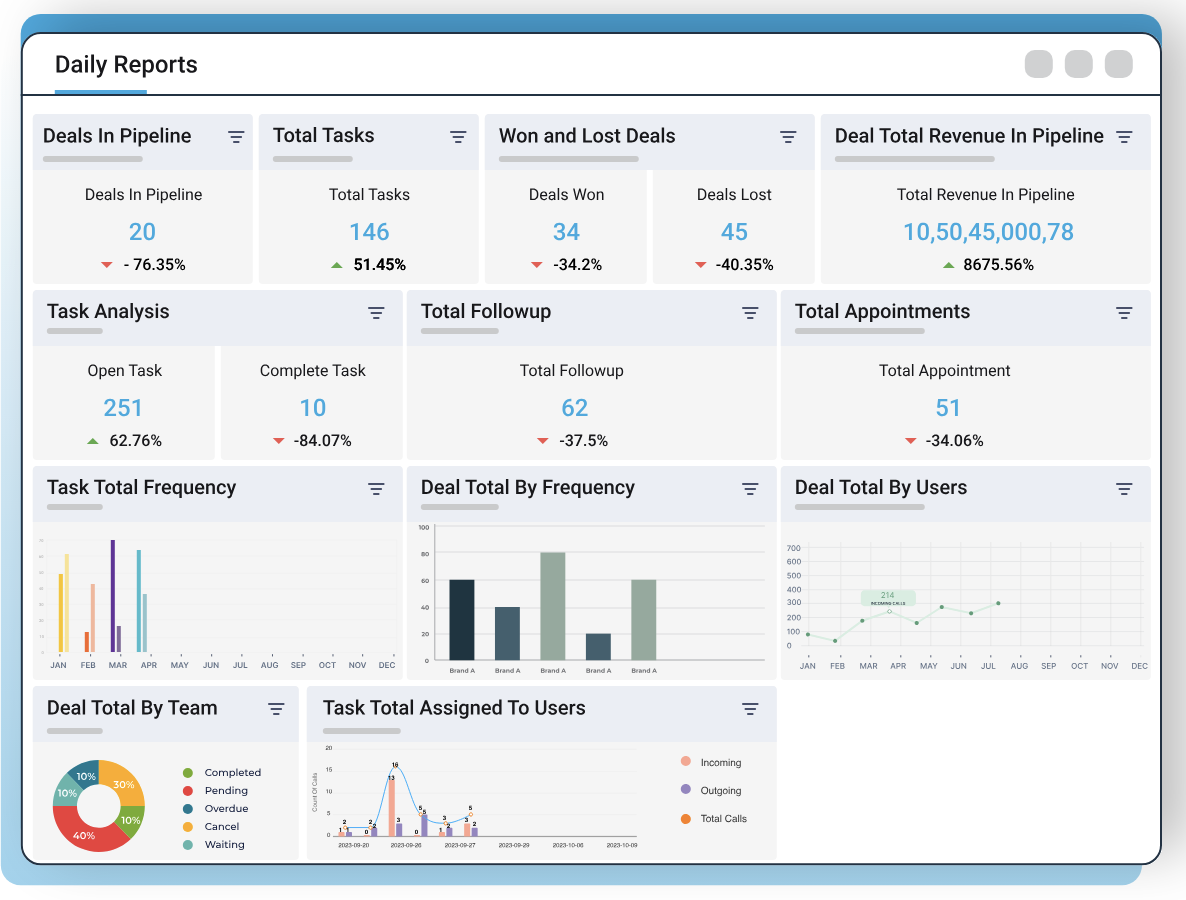
I’ve also come across positive feedback around affordability. Many users mention that CRMOne offers a strong balance of features and pricing, making it especially appealing for startups and smaller businesses that need CRM functionality without enterprise-level costs.
Based on my review of recent user feedback, the biggest challenge is that some advanced integrations and reporting features still feel limited compared to larger CRM platforms. A few users also mention occasional performance inconsistencies.
Overall, user sentiment reflects CRMOne as an easy-to-use and cost-effective CRM for managing customer communication and sales workflows. Users consistently praise its simplicity, automation, and value, while most criticisms focus on integration depth and advanced reporting.
“CRMOne offers a clean and user-friendly interface that makes it easy to manage leads and customer data in one place. The customizable workflows and organized dashboards help sales teams stay aligned and work more efficiently, while the support team is responsive whenever assistance is needed.”
- CRMOne review, Verified User in Information Technology and Services.
"AI-driven insights are limited, and the number of third-party integrations could be expanded."
- CRMOne review, Verified User in Information Technology and Services.
Already running QuickBooks? Not every CRM connects to it cleanly. See the best CRMs that integrate with QuickBooks, compared by G2 rating, pricing, and exactly how each one syncs.
Salesforce Sales Cloud, HubSpot Sales Hub, and ActiveCampaign consistently rank as top CRM options. They combine customization, automation, and AI-driven insights for scaling sales teams.
Bigin by Zoho CRM and Pipedrive are known for their simplicity, with visual pipelines and easy onboarding. HubSpot Sales Hub also stands out for its user-friendly design.
Bigin by Zoho CRM and Pipedrive are ideal for small businesses thanks to affordability and straightforward pipelines. HighLevel appeals to SMBs that want CRM, scheduling, and communication bundled into one all-in-one platform.
HubSpot Sales Hub and ActiveCampaign offer startups strong automation and email tools at accessible entry points. Monday CRM is popular for combining CRM with project and workflow management.
Steep learning curves, overwhelming feature sets, and change management are typical hurdles. Data accuracy also needs vigilance—periodic cleanup avoids duplicates and outdated entries.
Pipedrive and Monday CRM are frequently recommended for mid-size companies. They balance affordability, automation, and reporting with scalable workflows as teams grow.
Close and HubSpot Sales Hub are strong picks for software companies. They provide built-in calling, email, and automation that streamline SaaS sales cycles.
Salesforce Sales Cloud and SAP Sales Cloud lead for enterprises. They offer advanced AI, automation, and integrations with customer data platforms for global operations.
Bigin by Zoho CRM is built for small business owners with simple pipelines and low cost. CRMOne suits entrepreneurs who want CRM alongside built-in communication and workflow automation.
ActiveCampaign and Monday CRM fit growing tech startups. ActiveCampaign blends marketing automation with CRM, while Monday CRM unifies deals, tasks, and collaboration.
ActiveCampaign and HubSpot Sales Hub are standouts. Both integrate CRM with powerful automation for email campaigns, lead scoring, and segmentation.
HighLevel and Monday CRM are strong choices for service businesses. HighLevel adds scheduling, funnels, and client communication; Monday CRM supports client management across the full sales cycle.
Pipedrive is widely seen as intuitive with drag-and-drop pipelines and activity tracking. HubSpot Sales Hub also offers a clean, approachable experience.
ActiveCampaign supports e-commerce with automation, segmentation, and personalized outreach. Salesforce Sales Cloud scales for omni-channel retail operations.
Salesforce Sales Cloud remains the most comprehensive option. It combines AI insights, customizable workflows, and end-to-end integration across marketing, sales, and service.
By taking the time to evaluate what works best for your goals, you’ll find a CRM system that aligns with your vision and empowers your team to work more efficiently. For our team, the right CRM software made a huge difference in streamlining processes, improving communication, and staying on top of customer relationships.
We hope this list of the best CRM providers takes you one step closer to finding the right solution!
Integrate your CRM tools with the best project management software to create smarter workflows.


Businesses must put relationships over results, which isn’t to say results don’t matter. They...
 by Washija Kazim

As a salesperson in a small business, you juggle endless spreadsheets, a flooded inbox, and...
.png) by Devyani Mehta
by Devyani Mehta

Keeping track of your customers on a neverending Notes list no longer cuts it.
.png) by Tanuja Bahirat
by Tanuja Bahirat