


What do you see when you imagine a traditional data center? Probably a tiered architecture setup: independent server, storage, management, networking, and virtualization modules. You can’t run a data center without these IT infrastructures. But data center management isn’t easy with so many building blocks. Clunky data center operation slows down cloud workload handling, which stops you from meeting business demands.
Thankfully, hyperconverged infrastructure (HCI) exists. HCI is an IT framework that unifies software-defined storage, virtualized networking, and computing to ease data center resource centralization and management. Data centers turn to HCI solutions to combine their tech stack into a single platform, minimize complexity, and boost scalability.
A hyperconverged infrastructure is a software-defined architecture that integrates storage, compute, and networking virtualization into a distributed infrastructure platform for agile network management and quick network resource distribution.
Hyperconverged infrastructure virtualizes legacy storage hardware resources such as storage arrays, networks, and servers into a single system. This integration of data center server hardware and local storage devices helps automate IT provisioning and networking stack configuration.
The result is reduced dedicated storage hardware and operational cost. That’s why hyperconvergence is the first choice for bringing a cloud-like experience to on-premise systems and deploying a hybrid or private cloud.
Source: VMware Cloud Foundation
HCI lets you run software-defined storage and compute workloads together on a server. A virtualized compute and storage resource pool joins servers over Ethernet networks. These servers use virtual storage controllers to manage storage at the hypervisor or operating system layer. It can quickly scale according to your needs, which improves storage management, failover capabilities, and resiliency.
Hyperconverged infrastructure offers a software-defined, unified environment to help you implement performance upgrades. It also eliminates the complexity and risks associated with adding new hardware or restructuring existing systems.
Today, enterprises use more data and applications than ever before. This translates to higher computing power and infrastructure support. Building these capabilities makes a data center environment complex. Traditional data center infrastructure relies on multiple administrators, teams, and systems for computer, storage, and networking component management.
For example, a storage team only works with a storage hardware vendor to maintain storage subsystems. These teams use multiple management interfaces for handling different components.
The result? Higher maintenance costs and difficulties getting support from vendors.
The complexity of managing multiple systems frustrates IT teams. They want a scalable, flexible infrastructure that instantly provisions resources and delivers faster services. That’s where hyperconverged infrastructure comes in.
Enterprise companies use hyperconverged infrastructure to:
An HCI solution uses a distributed software layer to converge commodity data center server hardware with locally attached storage devices like spinning disks or flash. This convergence of storage, compute, virtualization, and storage networking components in a single, pre-configured hardware box minimizes operational costs while easing infrastructure setup and maintenance.
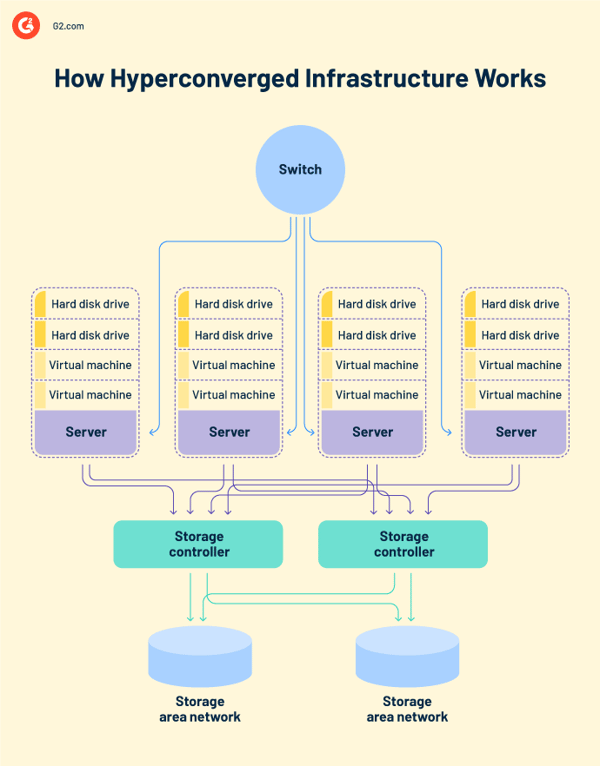
Hyperconverged infrastructure relies on a distributed platform to replace expensive legacy infrastructure. It uses industry-standard commodity servers that feature x86 processors, solid-state drives (SSDs), and hybrid hard drives (HHDs). These servers can start small and then scale as one server at a time, as the business needs. Software tools on these servers distribute operating functions across the entire cluster (a group of nodes or servers) to improve performance and build resilience.
Hyperconverged appliances feature pre-installed virtual storage area network (SAN) controllers, which are essentially virtual machines (VMs) running on hypervisors located on servers. These virtual SAN controllers manage input/output (I/O) traffic and storage-level tasks such as:
Hyperconverged infrastructure also lets you independently scale central processing units (CPUs), random access memory (RAM), and storage resources with hardware platform configurations. You can also leverage these configurations, even if you don't use a graphical processing unit (GPU) for graphics acceleration.
HCI solutions also offer a single management console that gives you a 360° view of nodes, clusters, and virtual SAN controllers. This single interface allows you to execute daily jobs without logging into multiple SAN environments.
Hyperconverged infrastructure architecture combines compute, storage, and network services in an integrated software layer.
Depending on the vendor offers, you'll find two types of hyperconvergence storage architectures – virtual storage appliance (VSA) and hypervisor-embedded storage virtualization. A typical HCI platform also uses a hardware chassis, a hypervisor, and a SAN controller.
Virtual machines run the infrastructure resource pool in a VSA-based storage model. They take the physical storage from the hypervisor and give other VMs access to that storage. VMs read and write data through virtual storage appliances that structurally live in the I/O path.
A hypervisor-level process manages the physical storage and makes it available to VMs in hypervisor-embedded storage virtualization. In this model, the hypervisor is responsible for managing storage devices.
In both cases, a hyperconverged infrastructure platform offers storage virtualization to guarantee complete control over the infrastructure stack.
Now, let’s look at each software layer in detail.
Compute virtualization creates virtual versions of computing hardware and networks. It consolidates servers which are then considered as a pool of resources by VMs. IT teams can share and access this centralized infrastructure from anywhere. As a result, they can reduce the number of physical devices behind an architecture.
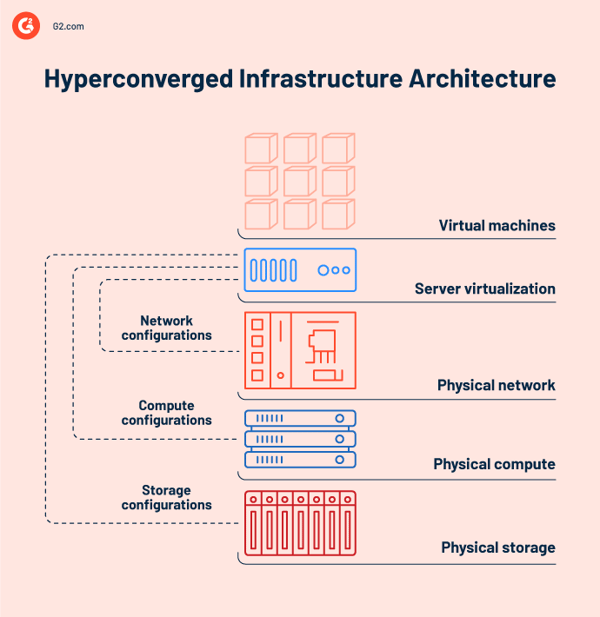
Storage virtualization uses a central console to pool physical storage from multiple storage devices into a single storage device. Virtual machines rely on storage virtualization to spot and aggregate available storage capacity from physical devices.
Virtual storage solutions must be able to intercept and send incoming I/O requests from VMs to appropriate storage devices in a virtualized environment, or the whole process will fall apart. Users don't see virtual storage; to them, it just looks like a single physical drive or logical unit number (LUN) that reads and writes.
Network virtualization combines available network resources for three purposes: to aggregate physical networks into one virtual network, to connect VMs with software networks, or to divide a network into segments. It eliminates the need for network configuration before moving VMs across domains. Network administrators design isolated virtual network layers that share the same physical network fabric using network virtualization software.
Converged infrastructure (CI) is a hardware-focused, building block-based method that unites server appliances, storage, and processes in one compact hardware set. Hyperconverged infrastructure does the same thing but with a software-defined approach that simplifies IT component deployment and management from a single dashboard. Public or private cloud computing infrastructure is a single architecture that integrates physical storage, compute, and network resources.
Converged infrastructure makes data center management easier with a pre-packaged system bundle that features compute, storage, and networking components. This single system eliminates the need to purchase hardware and software components separately from different vendors. Pre-configured system elements in the bundle let you deploy infrastructure faster.
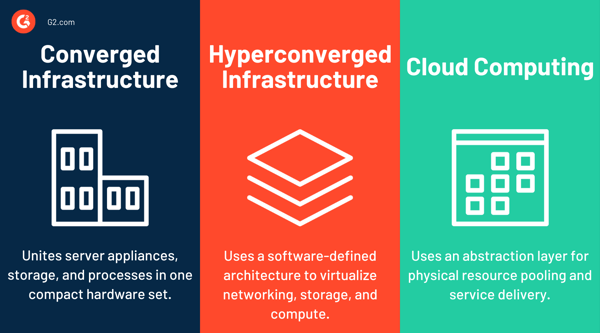
Hyperconverged infrastructure or ultra-converged infrastructure uses software-defined networking, storage, and a hypervisor to manage compute resources. The software is in charge of the resources that exist on the top of the hypervisor. This software-defined approach is flexible and supports modern workloads.
Cloud computing infrastructure relies on an abstraction layer for physical resource pooling and service delivery. Cloud eases configuration and deployment with application programming interfaces (APIs) or user interfaces. Cloud services minimize upfront infrastructure costs as they don’t need local storage to run programs or share data. But it can be complex to set up cloud infrastructure.
Companies shopping for hyperconverged infrastructure can either choose a hardware-agnostic hyperconvergence platform or HCI hardware, also known as an integrated HCI appliance, from a single vendor. HCI software lets you bring your own technology and deploy the infrastructure. With HCI hardware, you have to buy the hardware/software package from a single vendor.
| HCI software | HCI hardware | |
| Form | Software platform | Hardware appliance |
| Function | It virtualizes hardware resources for optimal performance, storage distribution, and resilience. | It optimizes storage-to-CPU ratio based on IT infrastructure needs. |
| Benefit | HCI software offers hyperconvergence benefits on existing commodity hardware. | HCI hardware supports high-intensity IT workloads, high hardware modularity, and scalability. |
| Challenge | Existing hardware may need additional monitoring and management software for integration. | It can be pricey. Capacity addition is possible only with extra node installation. |
Plug-and-play HCI appliances have multiple benefits: minimal configuration, easy troubleshooting, and better performance optimization. Plus, you don’t need in-house storage specialists because of round-the-clock support from the vendor. However, vendor lock-in happens sometimes. You may also have to pay extra if you want to add additional network and compute resources to enhance capacity.
Unlike HCI appliances, HCI software setup is more complex and time-consuming. But you don't have to buy a new software license every time you upgrade the hardware. HCI software solutions also make it easy to add capacity according to storage needs. You have complete control over what hardware you use and how you decouple or connect software-hardware layers.
Then again, think about the time your IT team will spend tracking bugs, solving integration issues, and coordinating patches with multiple vendors. Also, keep a close eye on hardware compatibility lists (HCLs) to keep firmware versions up-to-date.
Overall, it’s wise to consider the business case and choose the suitable technology. Do your due diligence before choosing a hyperconverged infrastructure.
Ask the following questions before investing in hypercoverged infrastructure solutions.
Hyperconvergence adoption started with use cases like virtual desktop infrastructure (VDI) and general-purpose workloads. Today, enterprises use HCI solutions for data center consolidation, edge computing, remote office/branch office (ROBO) deployment, cloud migration, and numerous other workloads. The result is efficient IT resource deployment and management with greater capital and operating expenditure advantages.
Companies implement HCI solutions to:
VDI implementation has always troubled desktop architects and chief information officers (CIOs) because of its architectural complexity and underperforming storage. With HCI solutions, you can streamline every VDI element in one package and stay cost-efficient. So how does that work?
Virtual desktops consist of hundreds or more VMs that can get busy simultaneously. These desktops need scale-out capacity expansion to be able to add new hardware resources. Hyperconverged infrastructure solutions combine different VDI elements into a single appliance.
Each HCI host adds compute and network resources to the storage resource pool. When you have multiple HCI clusters, you don’t need different resources or new storage arrays to scale. The flexibility of adding more nodes helps you grow your DaaS business. That’s why HCI remains the first choice for diverse data workloads of the Internet of Things (IoT), files, apps, and videos.
Some companies prefer to run some things on the premises and others like the cloud better. For example, they might want to keep enterprise resource planning (ERP) systems, point-of-sale (POS) solutions, or warehouse management tools near the on-premise client workstations. They might also need robust administration capabilities if their IT department is small. Hyperconverged solutions help in creating edge environments that they can easily scale up or down.
Companies with remote offices and branch offices also use hyperconvergence to create virtualization clusters with a couple of physical servers. This means IT teams can easily manage infrastructure with a single view of all ROBO locations.
A better end user experience comes from less time spent managing infrastructure. That’s why IT operations teams prefer HCI solutions to merge servers, networking, and storage systems. Consolidating data center operations helps them improve workload capacity planning and reduce infrastructure silos.
Some companies also use HCI platforms to combine servers and redundant arrays of independent disks (RAIDs) so they can focus more on virtual machine services.
As you know, an HCI solution scales storage, RAM, and CPU at the same time. But what if a workload requires more of one resource than another? Will you end up buying unnecessary resources? Not really.
Most HCI platforms today feature storage-dense nodes, which increases storage capacity without compute and improves the storage-to-compute ratio. This is why enterprises use hyperconvergence for logging and analytics as well.
Companies maintaining logs need infrastructure that supports fast writes while handling high data velocity. The underlying platform must be able to expand storage capacity quickly. Similarly, enterprises mining data for insights need an IT environment that supports fast reads to help analytics platforms generate results faster.
Both use cases require steady capacity building over time to support write- and read-intensive workloads. HCI solutions let you scale out as you grow. The total cost of ownership (TCO) is therefore lower than if you had to pay upfront for storage capacity.
Hyperconvergent environments feature data protection capabilities, too. They use VM-centric replication within an HCI cluster or from one cluster to another to back up and protect data. The scalable storage capabilities help replicate and store data in another cluster or physical location. HCI tools generally offer disaster recovery (DR) failover automation or hypervisor failover solutions.
HCI 1.0 bundles resources under a standard management layer, whereas HCI 2.0 improves flexibility by letting you disaggregate software from hardware resources.
First-generation hyperconverged infrastructure, aka HCI 1.0, uses standardized nodes to integrate storage, compute, and network resources. This approach doesn’t let you upgrade components independently. You’ll always end up paying more because you have to add resources and software licenses.
Next-generation hyperconverged infrastructure, or HCI 2.0, uses a composable infrastructure to put network, compute, and storage resources in a virtual resource pool. Since you can disconnect software resources from hardware, you can upgrade what you need without paying more.
Besides offering easy infrastructure deployment, management, and upgrades, hyperconverged infrastructure solutions keep you agile, offer a cloud-like experience, and maintain low costs.
Hypercoverged infrastructure isn’t free from challenges. Companies make several mistakes while sourcing, buying, and implementing HCI systems. Be careful of these common pitfalls.
Consider reviewing the three types of HCI deployment models below when you add hyperconverged infrastructure to a traditional data center.
Hyperconverged infrastructure is the backbone of modern IT. Without the right solution, you can’t virtualize traditional hardware-defined systems. Check out the top HCI solutions in 2026 here.
To be included in this category, a software product must:
*These top five leading hyperconverged infrastructure solutions come from G2’s Summer 2026 Grid® Report. Some reviews may be edited for clarity.
Sangfor Cloud Platform is a great fit for organizations looking for a centralized approach to hyperconverged infrastructure. What stood out to me was how often reviewers mentioned simpler day-to-day management after moving to the platform. Reliable performance, built-in security, and centralized infrastructure management came up consistently across G2 reviews. While a smaller integration ecosystem was one of the few recurring limitations
"What stands out most about Sangfor HCI is the way it combines stability, ease of use, and integrated capabilities. The solution feels very stable, with built-in high availability and data redundancy, plus integrated backup/CDP that help keep critical workloads running while also simplifying disaster recovery."
- Sangfor Cloud Platform review, Egon Leon D.
Although it’s generally a very practical solution, there are some areas where it falls short or could be improved. In particular, third-party integration options can be somewhat limited; when I wanted to achieve deep integration with different systems, I felt that the options were limited.
- Sangfor Cloud Platform review, Nur Sema A.
Nutanix Cloud Infrastructure (NCI) features built-in virtualization solutions and a distributed storage fabric to consolidate workloads and achieve data locality for high performance.
“The simplicity and power of the product are beyond phenomenal. Everything is laid out in a foolproof manner, and regardless of how simple it looks, all of the features that are required are right in front of your face, and if you require something more advanced, it can be done from the command line interface (CLI).”
- Nutanix Cloud Infrastructure (NCI) Review, Jacob L.
“It needs to improve its user interface. The initial cost may be higher than that of other providers. Also, I wasn’t too fond of its one-click feature to understand more about each concept.”
- Nutanix Cloud Infrastructure (NCI) Review, Sumit K.
VMware vSAN stood out to me as the most enterprise-focused platform in this comparison. Rather than emphasizing simplicity or affordability, reviewers consistently valued its virtualization capabilities, centralized infrastructure management, and scalability. Those strengths continue to make it a strong choice for larger deployments, even if implementation can require more planning.
“I like how it simplifies storage management by converging compute and storage into a single platform. Instead of managing storage arrays, storage resources are aggregated directly from ESXi hosts, which reduces the infrastructure complexity and operational costs. It is also the combination of performance, simplicity, and operational visibility. From the support standpoint, it provides excellent visibility into the health of the storage.”
- VMware vSAN, Eduardo F.
“One aspect that doesn't work well for me with VMware vSAN is how scaling is tied together. If we only need more storage, we still have to add a full node with compute resources, which isn't always efficient. Additionally, in some cases, troubleshooting performance issues can take a bit longer because everything is abstracted into the same layer, so it's not always immediately clear where the bottleneck is.”
- VMware vSAN, Devesh B.
Scale Computing Platform stood out to me as one of the simplest HCI platforms to manage. As I went through the G2 reviews, I found users spending less time talking about individual features and more time describing how easy the platform is to deploy, manage, and maintain. Reliable performance and responsive customer support came up just as often, especially among smaller IT teams looking to reduce day-to-day administrative overhead.
“Unshakeable Stability in Any Environment. Stability is the cornerstone of this platform. Even when placed in an unstable network environment, the H3 system remains resilient. We have never experienced data corruption or data loss, which gives us immense peace of mind.”
- Scale Computing Platform, James T.
“We had a number of problems getting the network up and going as we needed it, so all setup had to be done via console directly connected. It seems a lot of this was due to the Cisco switches and not our Scale nodes, but they all came as a package deal for us.”
- Scale Computing Platform, Brian S.
StorMagic feels like a product that knows exactly what it's trying to do. As I read through the recent reviews, users consistently praised its straightforward deployment, dependable performance, and responsive support, while discussions around advanced features took a back seat. That balance of simplicity and reliability came through in review after review.
"Getting it set up was easy and fast, especially for a 2-node setup. It didn’t take long to get everything up and running, and once it was in place, it has been very reliable. I also appreciate how straightforward the interface is; nothing feels overly complicated or cluttered. Whenever we’ve reached out for support, they’ve been responsive and helpful, and we genuinely value their ongoing assistance. Their commitment to providing top-tier service really helps them stand out in the industry."
"StorMagic features are pretty focused, so it might not handle advanced storage scenarios. The monitoring tools could also use a bit more depth."
- StorMagic review Kenji Wai C.
The best hyperconverged infrastructure solution depends on your existing environment, scalability requirements, and management priorities. Here's a quick comparison of the leading HCI platforms based on their strongest use cases and capabilities.
Data centers are increasingly adopting HCI for improved security, ease of management, operational efficiency, and infrastructure consolidation. You imagined the traditional data center setup at the beginning of this article. Now, it’s your turn to adopt and transform.
Explore top data virtualization software to effortlessly store, retrieve, and integrate data with virtual data layers.

Enterprise IT teams using hardware-bound IT infrastructure connect data storage operations to...
by Sudipto Paul
In legacy IT environments, network glitches and performance lags often required manual...
 by Sagar Joshi

What is hyperconverged storage? Hyperconverged storage is a type of storage architecture that...
 by Alyssa Towns